> For the complete documentation index, see [llms.txt](https://documentation.botghost.com/llms.txt). Markdown versions of documentation pages are available by appending `.md` to page URLs; this page is available as [Markdown](https://documentation.botghost.com/general-settings-and-collaboration/status.md).
# Status
Change the "Listening to 👻 Made with BotGhost.com 👻" status to something of your own!
{% hint style="warning" %}
This module requires a [Premium Subscription](/premium/premium-and-priority-hosting-plans.md#premium-plans) to function.
{% endhint %}
The [Status module](https://dashboard.botghost.com/dashboard/module/42056fd5-1c1d-4f89-8db7-794fe732424c/status) allows you to change the status on your bot to something of your own. You can also configure a command that allows you to change it directly from your server.
## Settings
### Status Mode and Settings
#### Status Mode
This setting allows you to set the status mode you prefer. Below you may find some information on each mode.
{% tabs %}
{% tab title="Disabled" %}
When selecting this option, the status of the bot will be disabled, and no status will be shown in the bot's profile.
{% endtab %}
{% tab title="Fixed" %}
The fixed option allows you to set your bot's status in a fixed state, which means it will always remain the same until changed from the dashboard.
#### Status Type
This setting allows you to set the status type. You can set it to "Listening", "Playing" or "Watching".
#### Status Text
Here, you can set your own custom text for the status, and will appear right next to the selected status type.
{% endtab %}
{% tab title="Rotating" %}
The Rotating mode allows the bot to cycle through several statuses in the order they were added at a specified duration.
### Adding Rotating Statuses
Once you set the status mode to "Rotating" a new menu will appear, allowing you to setup up to 100 rotating statuses. Below you can find all available settings.
#### Status Duration
The status duration field allows you to input the time in seconds you want the status to show in the bot's profile. The minimum duration is 30 seconds, and the maximum is 86400 seconds (1 day)
#### Remove Status
Here you may toggle whether the bot will have a status/presence showing during this status rotation. Turn the option on to remove the status.
#### Status Type
This setting allows you to set the status type. You can set it to "Listening", "Playing" or "Watching".
#### Status Text
Here, you can set your own custom text for the status, and will appear right next to the selected status type.
{% hint style="info" %}
To save the rotating status's settings, you need to click "Add" in the bottom-right corner of the settings. This will reset the fields so you can set up another rotating status.
{% endhint %}
### Viewing Active Rotating Statuses
You can edit all active rotating statuses through a list right below the menu.
{% hint style="info" %}
To save the edits you made on the rotating status's settings, you need to click "Edit" in the bottom-right corner of the settings.
{% endhint %}
{% endtab %}
{% tab title="Command" %}
This mode enables a `/status` command that can be used in your server to update the status of your bot.
#### Embeds Color
This setting allows you to customize the color of responses of the bot.
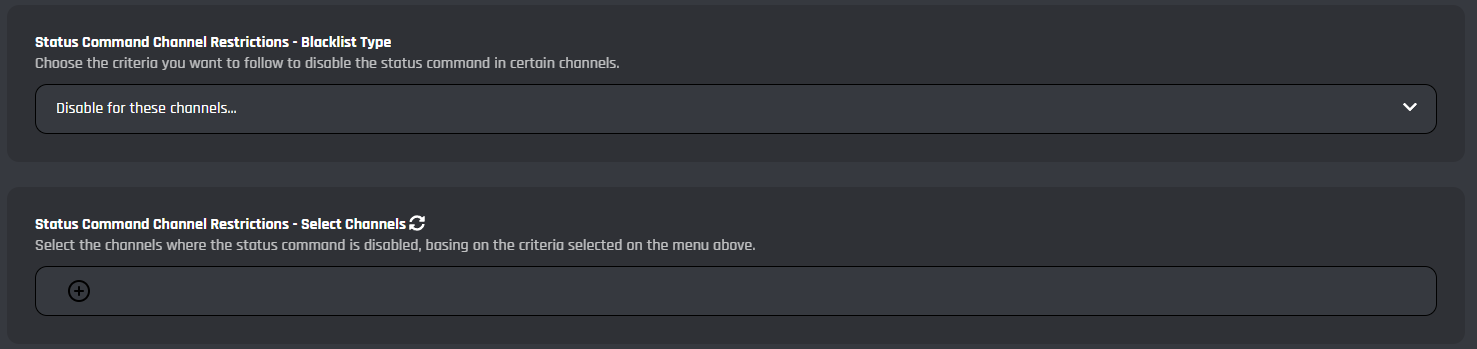
#### Status Command Channel Restrictions
You can setup channel restrictions to allow the usage of the `/status` command only in certain channels.
| Blacklist Type | Information |
| ----------------------------- | ----------------------------------------------------------------------------------------------------------------------- |
| No channel restrictions | Set this blacklist type if you want the command to work in all channels. |
| Disable for these channels... | Set this blacklist type if you want the command to work in all channels except the channels provided in the menu below. |
| Enable for these channels... | Set this blacklist type if you want the command to work only in the channels provided in the menu below. |
#### Status Command Role Restrictions
You can setup role restrictions to allow the usage of the `/status` only to certain roles.
| Blacklist Type | Information |
| -------------------------- | ---------------------------------------------------------------------------------------------------------------------------------------------- |
| No role restrictions | Set this blacklist type if you want everyone to be able to use this command. |
| Disable for these roles... | Set this blacklist type if you want the command to work for all users, except users with at least one of the roles provided in the menu below. |
| Enable for these roles... | Set this blacklist type if you want the command to work only for users with at least one of the roles provided in the menu below. |
{% endtab %}
{% endtabs %}
***
## Commands
In this area, you can view and modify the commands of the Status module. Below you may find some information on each command of the module.
/status
The `/status` command allows you to update or reset the status of the bot from your Discord server. The "Command" mode is required to be enabled in the settings page of the module.

## Events
In this area, you can view and modify the events of the Status module. Below you may find some information on each event of the module.
Restarts Handler
This event updates the status of the bot when it is restarted.
Updates Handler
This event makes sure the status is updated when changes are saved or the status is updated through the dashboard.
Rotating Status Handler
This timed event allows the rotating status feature to work as intended and update the status when the set time has passed. Make sure to not delete the associated timed event in the [timed events](/custom-commands-and-events/events/timed-events.md) module.
***
{% hint style="danger" %}
It's advised that you do not edit the commands and events unless you have a good understanding of BotGhost and its Command Builder. If you encounter any issues, you might want to reset the module for it to work again as intented.
Additionally, a copy of the edited commands / events will be created if you update the module.
{% endhint %}