# React to a Message

<figure><img src="https://1937909199-files.gitbook.io/~/files/v0/b/gitbook-x-prod.appspot.com/o/spaces%2F-Lm_hW5MApY3J0lRhi0M%2Fuploads%2FzAAfmpARM5hr3GdytJ0w%2Fimage.png?alt=media&#x26;token=406fd406-252d-4836-84b4-6834d22be814" alt=""><figcaption></figcaption></figure>

This action block will react with an emoji to any message in the builder or a specific message.

## Target Message

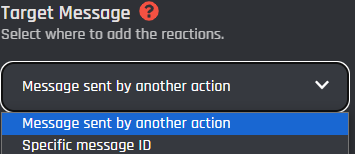
From this dropdown you can select what type of message the block should target in order to react to.

<figure><img src="https://1937909199-files.gitbook.io/~/files/v0/b/gitbook-x-prod.appspot.com/o/spaces%2F-Lm_hW5MApY3J0lRhi0M%2Fuploads%2FeLWJaFAxmhcTw7xXNUEu%2Fimage.png?alt=media&#x26;token=5e452854-a703-421d-acfc-943306ee305a" alt=""><figcaption></figcaption></figure>

{% tabs %}
{% tab title="Message sent by another action" %}
If this type is chosen then you may select a block from the builder to be targeted for the reaction.

## Response Action

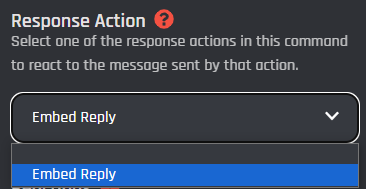
Pick the message action you want reactions to be added to from this menu.

<figure><img src="https://1937909199-files.gitbook.io/~/files/v0/b/gitbook-x-prod.appspot.com/o/spaces%2F-Lm_hW5MApY3J0lRhi0M%2Fuploads%2FyNFI4o7l5ZKCJ46aRHqf%2Fimage.png?alt=media&#x26;token=3b074c03-56b6-43d3-abc7-4ff4bfdcb0d2" alt=""><figcaption></figcaption></figure>
{% endtab %}

{% tab title="Specific message ID" %}
When this type is selected, it will allow you to choose a specific message to add a reaction to in your discord server by specifying the IDs.

### Channel ID

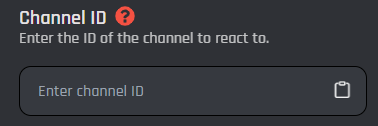
In this field is where you input the channel ID of where the message is located to target it. This field also only accepts a plain channel ID with no extra symbols or spaces / [variables](https://documentation.botghost.com/custom-commands-and-events/variables).

<figure><img src="https://1937909199-files.gitbook.io/~/files/v0/b/gitbook-x-prod.appspot.com/o/spaces%2F-Lm_hW5MApY3J0lRhi0M%2Fuploads%2FWdGHFjiVBLAZkApXT0jq%2Fimage.png?alt=media&#x26;token=e9af4805-bc0c-4679-b84c-d9ed70b0500e" alt=""><figcaption></figcaption></figure>

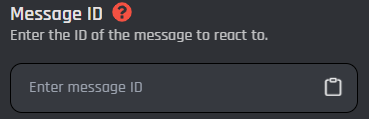
### Message ID

In this field is where you input the message ID of the message you want to react to. This field also only accepts a plain message ID or a [variable](https://documentation.botghost.com/custom-commands-and-events/variables) that contains one.

<figure><img src="https://1937909199-files.gitbook.io/~/files/v0/b/gitbook-x-prod.appspot.com/o/spaces%2F-Lm_hW5MApY3J0lRhi0M%2Fuploads%2FGwUOQLbkOTDKIc3pob2i%2Fimage.png?alt=media&#x26;token=f018d441-8253-4039-a108-70ed464cae8b" alt=""><figcaption></figcaption></figure>
{% endtab %}
{% endtabs %}

## Reactions

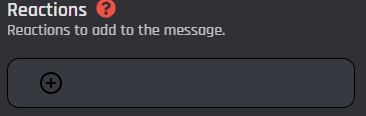
In this section is where you can choose and apply which reactions will be added to the targeted message. Click the "+" icon to add the reactions. This field only allows you to add default emojis.

<figure><img src="https://1937909199-files.gitbook.io/~/files/v0/b/gitbook-x-prod.appspot.com/o/spaces%2F-Lm_hW5MApY3J0lRhi0M%2Fuploads%2Fk7CVEkqtNhQ3Rc8XieDi%2Fimage.png?alt=media&#x26;token=934fd2ac-65b9-4c7a-b6c4-1e569291a7f1" alt=""><figcaption></figcaption></figure>

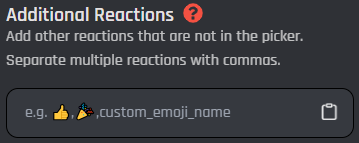
## Additional Reactions

Since you can't pick custom emojis from the [#reactions](#reactions "mention") field, this input allows you to add custom reactions to the message. Separate the reactions with commas and you can learn more about how to input a custom emoji [here](https://documentation.botghost.com/getting-started/standard-practices/advanced-practices#how-can-i-get-a-custom-emojis-id).
<figure><img src="https://1937909199-files.gitbook.io/~/files/v0/b/gitbook-x-prod.appspot.com/o/spaces%2F-Lm_hW5MApY3J0lRhi0M%2Fuploads%2FPi1HjvVCImypnGeRm1RC%2Fimage.png?alt=media&#x26;token=4cc63c6c-8d3b-4816-852d-7087435782a2" alt=""><figcaption></figcaption></figure>


---

# Agent Instructions: Querying This Documentation

If you need additional information that is not directly available in this page, you can query the documentation dynamically by asking a question.

Perform an HTTP GET request on the current page URL with the `ask` query parameter:

```
GET https://documentation.botghost.com/custom-commands-and-events/actions/message-actions/react-to-a-message.md?ask=<question>
```

The question should be specific, self-contained, and written in natural language.
The response will contain a direct answer to the question and relevant excerpts and sources from the documentation.

Use this mechanism when the answer is not explicitly present in the current page, you need clarification or additional context, or you want to retrieve related documentation sections.